
Linux
Instructions for installing Nara software on Linux operating system.
Ubuntu 22.04 & 24.04
Info
See System Requirements for more information about the required hardware and software before installing Nara.
Download Nara for Ubuntu
Download and select the latest version of Nara:
- Ubuntu 24.04: Download
- Coming soon for Ubuntu 22.04
There are two installation types:
nara_*.deb: Full installationnara-core_*.deb: Patch installation for users who have already installed Nara and want to update to the latest version.
With two hardware acceleration modes:
cpu: CPU-only, suitable for all systems but with limited performance.gpu: CUDA acceleration, suitable for systems with NVIDIA GPU that meets the requirements in NVIDIA CUDA GPUs.
See Hardware Acceleration Support for more details.
Install Dependencies
GStreamer
- To install the GStreamer bad plugins run the following command in the terminal:
sudo apt-get update && sudo apt-get install -y gstreamer1.0-plugins-bad
FFmpeg
- To install FFmpeg run the following command in the terminal:
sudo apt-get install -y ffmpeg
Install Nara
Info
If you have Nara installed already, uninstall it before installing the new version. See the Uninstall Nara section for more information.
Install with Software Center
- Once you have the installation file (
nara_[mode]_[version]_amd64_ubuntu_[ubuntu_version].deb), navigate to the folder where the installation file is located.
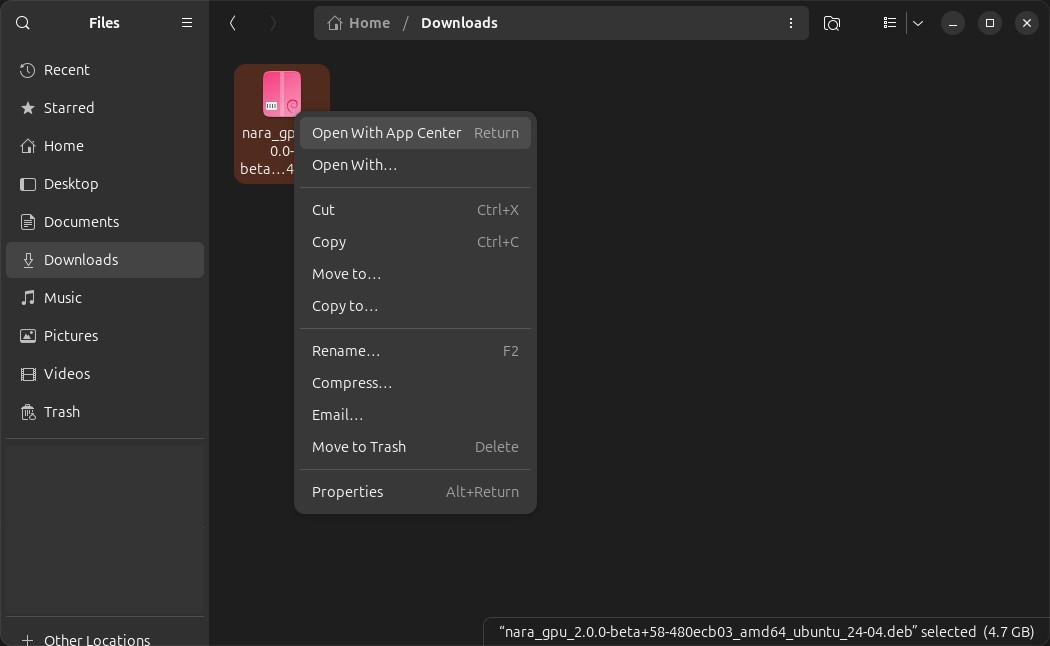
- Right-click on the installation file and click on
Open With AppCenter(Open With Other Applicationthen selectSoftware InstallifAppCenteris not in the quick access menu). - Click on
Installto start the installation. - Enter your password and click on
Authenticateto continue with the installation. - You are now ready to use Nara!
Install with Terminal
- Once you have the installation file (
nara_[mode]_[version]_amd64_ubuntu_[ubuntu_version].deb) open the terminal and navigate to the folder where the installation file is located. - Run the following command in the terminal:
sudo apt-get install -y ./nara_[mode]_[version]_amd64_ubuntu_[ubuntu_version].deb - You are now ready to use Nara!
Info
For example, if the Nara installer in the Downloads folder with the gpu mode, version 2.0.0-beta, ubuntu version 24-04, the command will be:
cd ~/Downloadssudo apt-get install -y ./nara_gpu_2.0.0-beta_amd64_ubuntu_24-04.debNote
N: Download is performed unsandboxed as root as file
'/home/path/to/nara-core_*.deb' couldn't be accessed by user '_apt'.
- pkgAcquire::Run (13: Permission denied)
This message may appear during installation, but it can be safely ignored as the installation will still complete successfully.
Patch Nara
Instead of installing the whole Nara software, you can also choose to only patch the Nara core component, usually when updating within minor versions.
Warning
Make sure that your current patch version is compatible with your Nara version. Please refer to the release notes for more information about the compatible patch version for each Nara version.
- Once you have the installation file (
nara-core_[mode]_[version]_amd64_ubuntu_[ubuntu_version].deb) open the terminal and navigate to the folder where the installation file is located. - Run the following command in the terminal:
sudo apt-get install -y ./nara-core_[mode]_[version]_amd64_ubuntu_[ubuntu_version].deb - You have now successfully patched Nara!
Uninstall Nara
- Open the terminal.
- Run the following command in the terminal:
sudo apt-get remove nara-core nara - Enter your password