
While Loop · Reading video frame by frame
Why a video Input reads only one frame, how the While Loop Node repeats the work to make it continuous, why the picture should be resized before anything else uses it, and what Loop Delay, Break Loop, and Invert Break Condition do.
1. The problem: one frame and nothing more
Say we want to build a Flow that takes video as its Input and shows it on the Dashboard.
The Dashboard can't read from an Input Node directly, so it needs a Data Node in between. For video or images, that means a Variable of type image, which the Widget on the Dashboard then reads from.
Wired the straightforward way it looks like this: a Deploy Trigger starts the Flow, the Webcam Node captures the picture, then Variable Modify writes it into the Image Variable that the Dashboard displays.
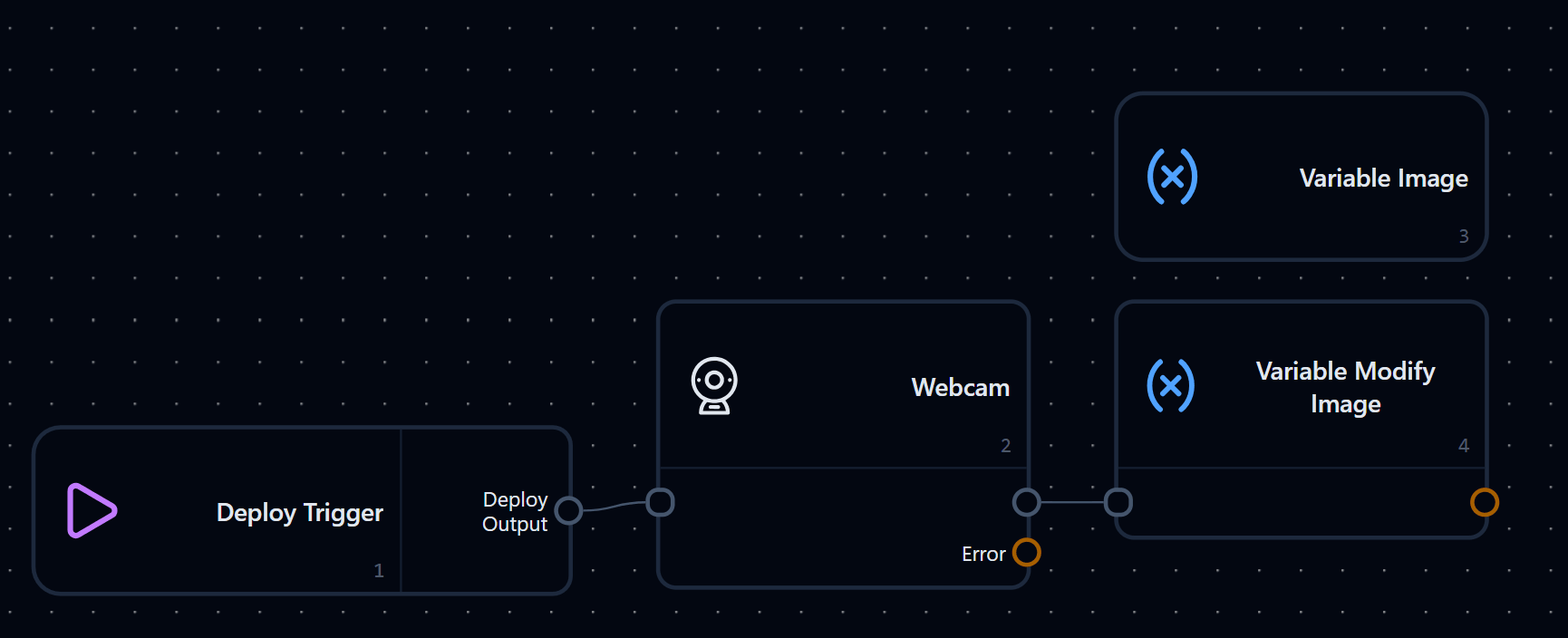
Press Deploy and the Flow does run, but the Dashboard shows a single still frame and stops right there. The Flow ran once, captured one frame, and finished. That isn't video.
2. The fix: put the work inside a While Loop
The While Loop Node repeats a sequence of Nodes. A video Input can come from a Webcam or a video file through Server Media Input. It provides one Frame each time it runs. Placing the video processing steps inside a While Loop allows the Flow to read and process Frames continuously. The loop continues until its break condition is met or the input source finishes.
Rearranged with a loop, the same Flow becomes this:
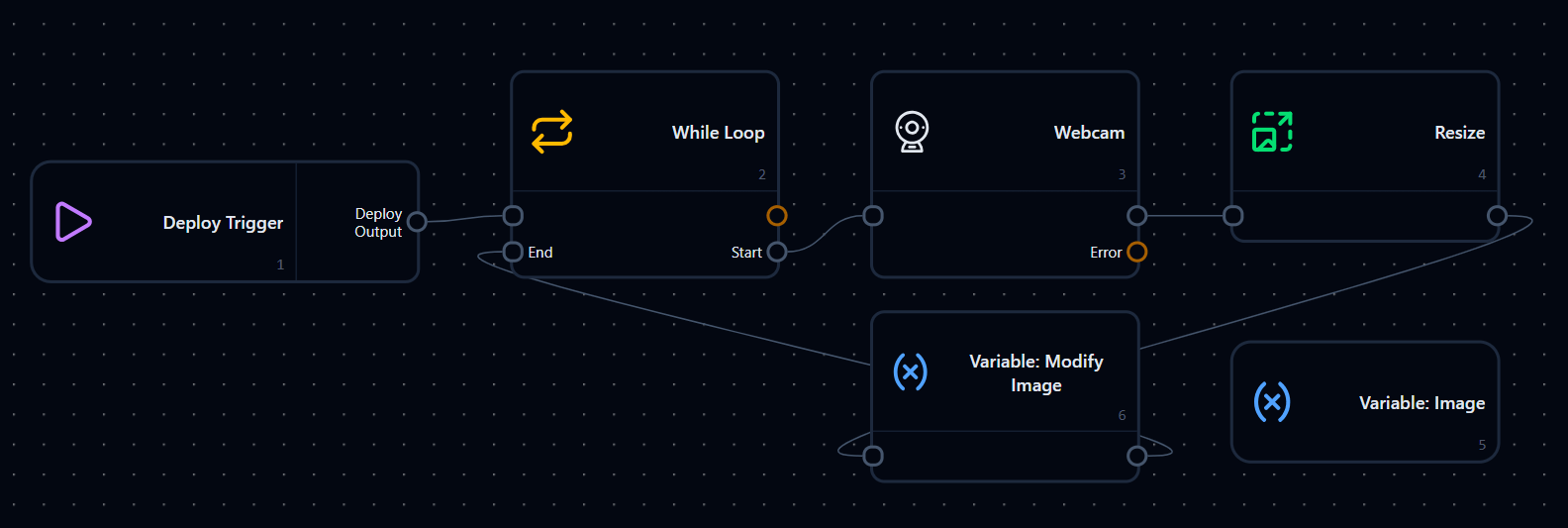
The Deploy Trigger now goes into the While Loop rather than straight into the Webcam. The Webcam, Resize, and Variable Modify all sit inside the loop, and the last Node connects back into the While Loop's End.
The one addition worth explaining is the Resize Node sitting between the Webcam and Variable Modify. It takes whatever the camera hands over and forces it to one fixed size before anything downstream touches it, so Variable Modify writes the resized picture rather than the raw one.
| Parameter | Value | Description |
|---|---|---|
| Input Image | frameOut from Webcam | The picture straight off the camera |
| Size | [1280, 720] | The size every Node after this point works with |
Resize the picture before you use it, not after
Camera resolution isn't something you get to control. Swap the webcam, open the same Flow on another machine, or point it at a video file instead, and the picture arriving is a different size. Anything measured in pixels then quietly lands in the wrong place: a zone drawn on the old picture, a counting line, a crop region.
A Resize right after the Input pins that down. Everything after it always sees the same dimensions, so the same Flow moves between cameras without redrawing anything, and a 4K feed doesn't get pushed through detection at full size, which is usually the difference between video that plays and video that crawls.
Make it a habit even in a Flow this small. It costs one Node now and saves rebuilding the Flow later.
Video files work the same way
The example above uses a Webcam, but a video file read through the Server Media Input Node behaves the same: one run, one frame. What turns a run of frames into video is the loop.
3. How a While Loop works in general
In ordinary programming, a While Loop tests a condition first, then repeats the body for as long as that condition holds.
4. How Nara's While Loop works
Nara works the same way, only expressed through the Node's Start and End connection points.
The thing to watch out for is the return path: the last Node inside the loop has to connect back into the While Loop's End. Without it, the loop never finishes a pass, and so it never starts the next one.
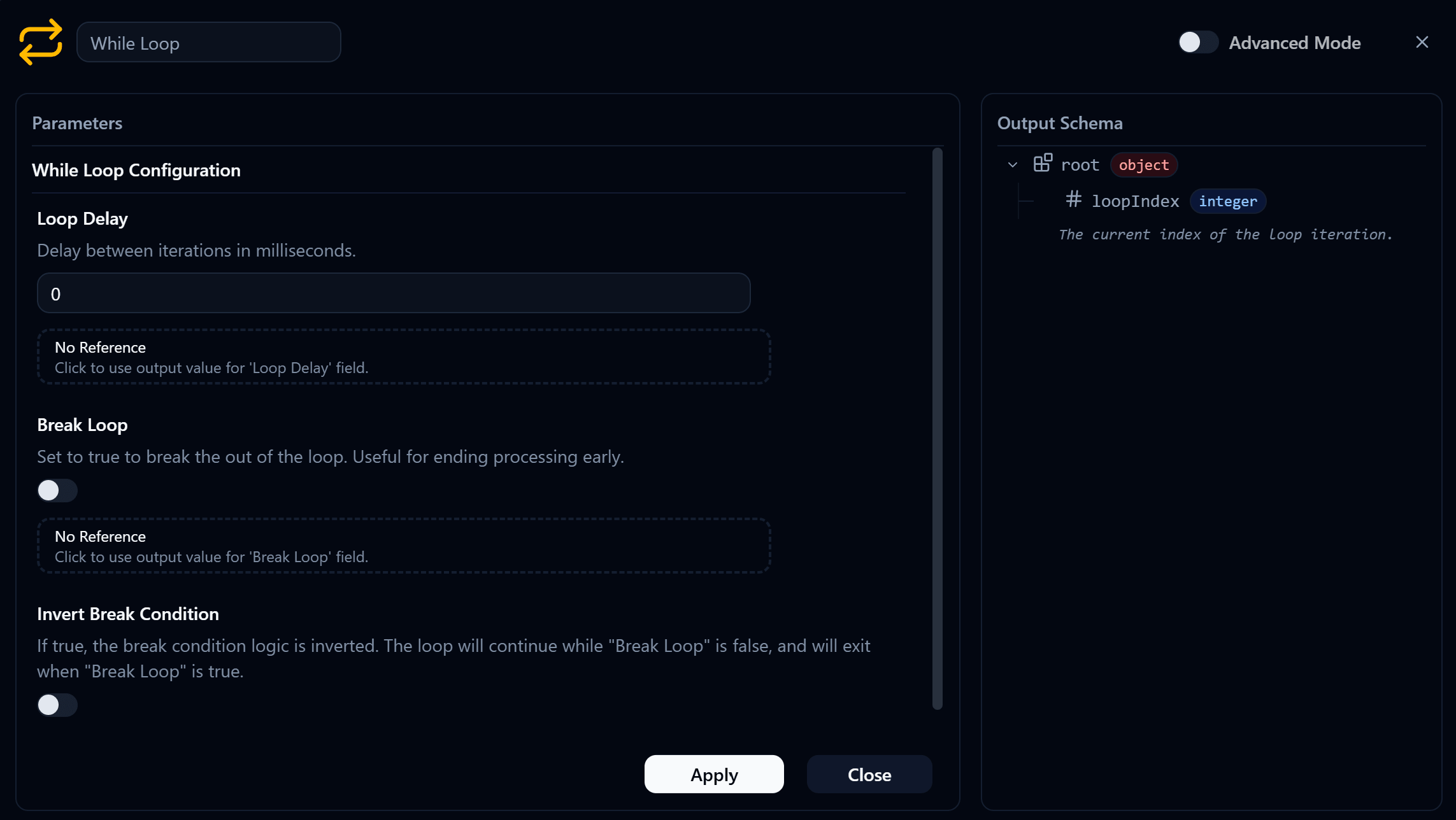
The Node itself has three settings.
5. Loop Delay
Loop Delay is the pause between passes, in milliseconds.
Set to 0, the next pass starts the moment the previous one ends, with no rest in between.
pass 1 → pass 2 → pass 3 → pass 4 → ...That runs as fast as each Node can process, which is usually what you want for video.
But if the video stutters or the Dashboard updates faster than it can keep up, try a Loop Delay of around 30-100 ms.
6. Break Loop
Break Loop decides whether the loop exits. Left at false with no Reference attached, it stays false the whole time.
- Break Loop = false → don't exit the loop → run the next pass
So the loop keeps running until one of these happens:
- you stop the Flow yourself
- an error occurs
- a Node inside doesn't return the signal to End
- Break Loop changes to
true
7. Invert Break Condition
Invert Break Condition is normally off (false), meaning the break condition reads the usual way.
Break Loop = false→ keep goingBreak Loop = true→ stop the loop
Turn it on and that reading is reversed. For this chapter, leave it off.
Next
With video looping, the next question is what to do with each frame. Continue to If-Then · Branching a Flow.
Operation · Controlling how a Flow runs
Learn how to process video frames with While Loop and create branching paths with If-Then and Switch Case.
If-Then · Creating conditional paths
Use If-Then to direct a Flow through Then, Else, or Skip, and build a Workshop that evaluates a Number Slider value from the Dashboard.