
Common Process Inputs
This page documents inputs that appear across multiple process nodes. Each node page includes a brief description of the relevant input and links here for fuller explanation and tuning guidance.
Confidence Threshold
Minimum confidence score required to keep a detected result. Results with a score below this value are discarded before output.
Range: 0.0 to 1.0
- Lower values retain more results, including uncertain ones. Use when missing a detection is more costly than a false positive.
- Higher values require stronger model confidence before a result is kept. Use to reduce false positives in busy or cluttered scenes.
| Setting | Example |
|---|---|
| Lower confidence threshold | 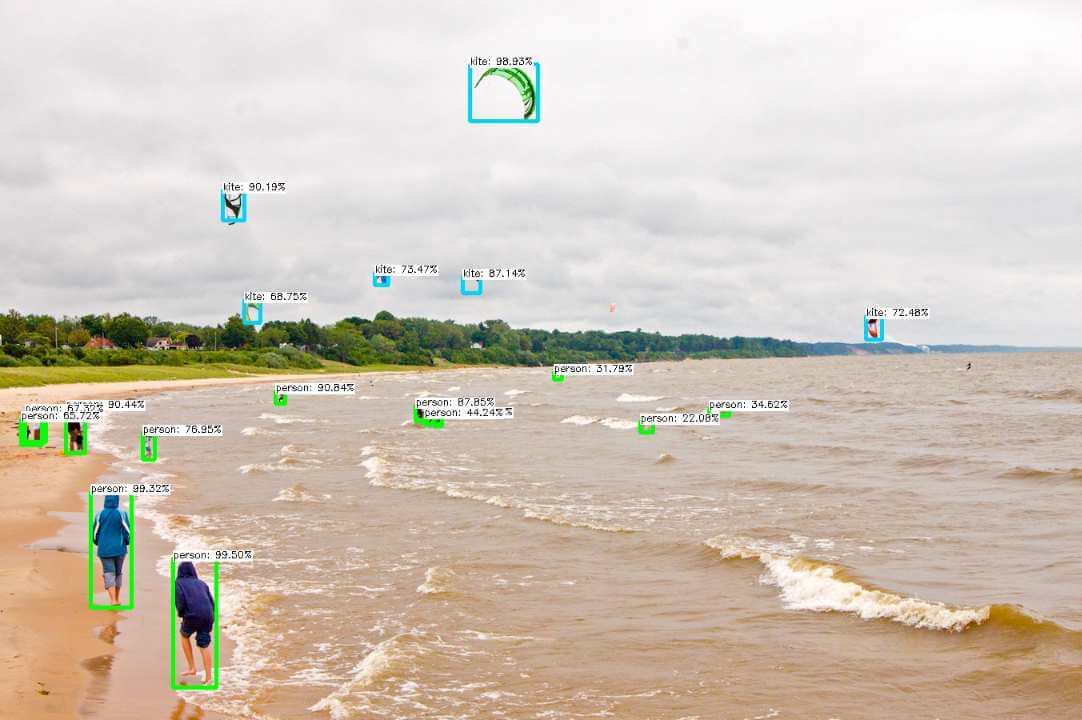 |
| Higher confidence threshold | 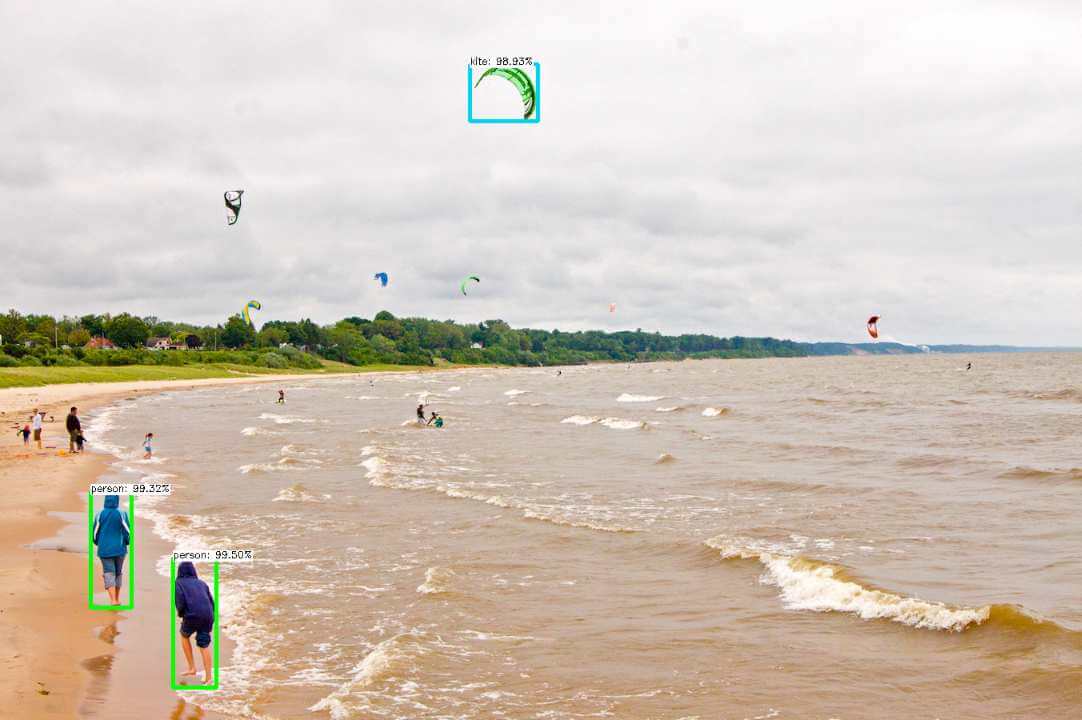 |
Overlap threshold
Overlap Threshold or Non-Maximum Suppression (NMS) threshold used to resolve overlapping detection boxes.
When a model produces multiple overlapping boxes for the same object, NMS keeps the highest-scoring box and suppresses the rest. This threshold controls how much spatial overlap between two boxes is allowed before they are considered duplicates.
Range: 0.0 to 1.0
- Lower values suppress more aggressively — only the top-scoring box per region survives.
- Higher values allow more overlap — useful when closely spaced objects of the same class should each produce their own box (for example tightly packed products on a shelf).
Lower Overlap threshold usually suppresses overlapping boxes more aggressively.
| Setting | Example |
|---|---|
| Lower Overlap threshold | 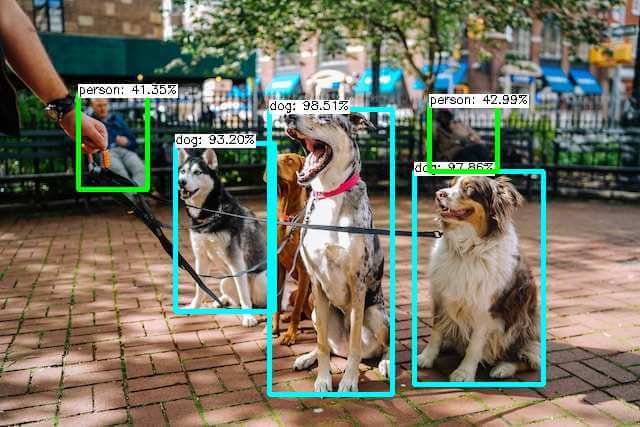 |
| Higher Overlap threshold | 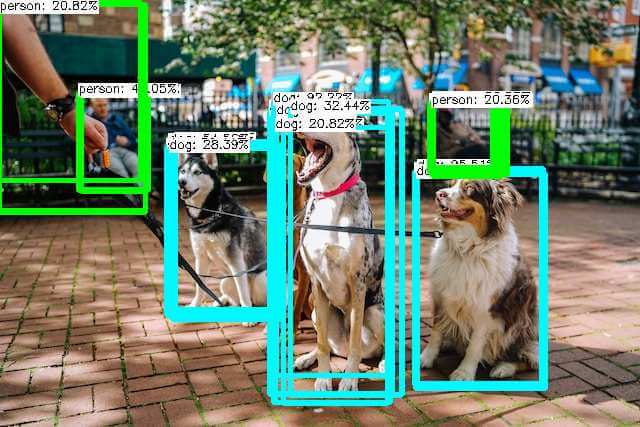 |
Overlay Results
Boolean flag that controls whether detected results are drawn on the output frame.
- When
true, the node draws bounding boxes, labels, contours, or other annotations on theOverlay Imageoutput. - When
false, theOverlay Imageoutput is the original input frame passed through unchanged. All detection data outputs are still produced regardless of this setting.
Disable overlays in production flows where downstream nodes require a clean, unmodified frame, or to reduce rendering overhead.
Overlay Alpha Mask
Opacity of the colored overlay drawn on the output frame.
Range: 0.0 to 1.0
Default: 0.5
0.0— overlay is fully transparent (not visible).1.0— overlay is fully opaque, hiding the image beneath it.- Values in the
0.3–0.6range typically give a readable overlay while keeping the background visible.
Only affects the image when Overlay Results is enabled.
Morphology
Morphological operations applied to binary or color-thresholded masks before contour extraction.
Morphology is used to clean up noise, fill small gaps in detected regions, and smooth region boundaries. Two fundamental operations are available:
- Erode — shrinks bright (white) regions. Removes small isolated pixels and narrows region edges.
- Dilate — expands bright regions. Fills small holes and connects nearby fragments.
Configuration includes the kernel shape (RECT, CROSS, or ELLIPSE), kernel size, and iteration count for each operation. Larger kernels and more iterations produce stronger effects.
A common pattern is to erode first to remove noise, then dilate to restore region size — this is known as an opening operation.
Color Thresholds
Array of one or more color rules used to isolate target-colored regions in the input frame.
Each rule defines:
- A color space (for example
HSV) - Minimum and maximum channel values that bound the target color range
Multiple rules are combined with a union, so any pixel matching any single rule is included in the output mask.
Use the Color Threshold node to preview and tune rules visually before connecting them to detection or segmentation nodes.
Model Directory Path
Path to the directory containing the model files to load for inference.
- For
.nammodels, point to the.namfile or folder that contains the.namfile. The node reads all required settings from the model package automatically. - For custom models, point to the folder containing the appropriate framework files (for example
.onnx,.pb, or a TensorFlow SavedModel directory).
The path must be accessible from the machine where the flow runs. If the path is incorrect or the required files are missing, the node fails to initialize with an error.
Custom Model Configs (AI Model Nodes)
Boolean flag that reveals additional framework and architecture configuration fields.
Only needed for models that are not packaged in .nam format. When enabled, extra fields appear for:
- Model framework (for example ONNX, TensorFlow Lite)
- Input tensor format (
NHWCorNCHW) and color format (RGBorBGR) - Input data type and normalization settings
For standard .nam models, leave this disabled — the node reads all configuration from the model package automatically.