
Face Detection
Overview
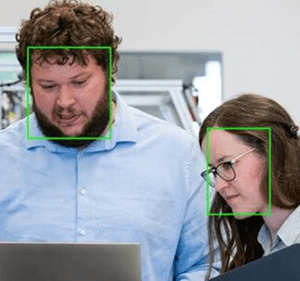
Face Detection node locates faces in an input image and returns bounding boxes, optional facial landmarks, and an overlay image.
Use this node to feed detected face regions into downstream nodes such as Face Recognition, blur/mosaic filters, or zone-based logic.
Input
Input Image
image requiredThe image frame to analyze. Connect this to an image output from an upstream camera or processing node.
Detection model
string required advancedFace detection backend to use.
Values:
ONNX_YUNET(default) — ONNX YuNet; faster, recommended for most use cases.TFDNN— OpenCV / TensorFlow DNN-based detector; use whenONNX_YUNETdoes not produce satisfactory results on your hardware.
Box Width / Box height
array advancedPixel [min, max] filters for face box width and height. Faces outside these ranges are discarded.
Default: [0, 100000] for each
Confidence threshold
number advancedMinimum confidence score to keep a detected face. Shown for ONNX_YUNET and TFDNN. See Confidence Threshold for tuning guidance.
Range: 0.0 to 1.0
Default: 0.5
Overlap threshold
number advancedNMS overlap threshold (higher allows more overlap). Shown for ONNX_YUNET and TFDNN. See Overlap threshold for tuning guidance.
Range: 0.0 to 1.0
Default: 0.3
Top K value
integer advancedApplies only when Detection model is ONNX_YUNET. Sets the maximum number of candidate face boxes to keep before NMS is applied. Lower values reduce computation at the cost of potentially missing distant or small faces.
Range: 0 to 10000
Default: 5000
Overlay results
boolean required advancedWhether to draw face bounding boxes on the output frame. See Overlay Results.
Default: true
Draw facial landmarks
boolean required advancedWhen enabled, draws facial landmark points on the overlay for each detected face.
Default: false
Output
Overlay Image
imageOutput frame from the node. If overlays are enabled, face bounding boxes and optional landmarks are drawn on this frame.
Detected Count
integerNumber of faces detected in the current frame.
Detected Faces
arrayArray of face detection objects. Each object contains:
- Bounding Box (
bbox):[x, y, width, height]in image pixel coordinates. - Landmarks Points — landmark
[x, y]points when available. - Landmarks Labels — labels for the landmark points.