
Number Plate Reader
Overview
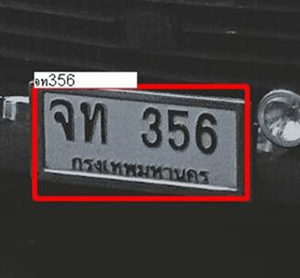
Number Plate Reader detects license plates in an input frame, reads the text from each plate, and returns decoded text, detection polygons, and confidence scores.
Use this node in vehicle access control, parking management, tolling, or any flow that needs to extract plate text from camera frames.
Input
Input Image
image requiredThe image frame to analyze. Connect this to a camera or upstream image output.
Detection Model
string requiredBalances processing speed against recognition accuracy.
Values:
SPEED(default) — optimized for real-time frame rates; suitable for high-speed lanes or high-frame-rate cameras.ACCURACY— optimized for maximum character recognition accuracy; suited for lower-frame-rate or still-image scenarios.
Character Type
string requiredExpected character set on the plates, used to constrain the recognition model and reduce errors.
Values:
NUM— digits only (0–9).NUM_LATIN(default) — digits and Latin letters (A–Z).NUM_THAI— digits and Thai characters.
Choose the character type that matches the plates in your region.
Draw Text
boolean requiredWhen enabled, draws the decoded plate text directly on the plate region in the overlay.
Overlay Results
boolean requiredWhether to draw detection polygons and labels on the output frame. See Overlay Results.
Output
Overlay Image
imageOutput frame from the node. If overlays are enabled, plate detection polygons, decoded text, and confidence scores are drawn on this frame.
Detected Count
integerNumber of license plates detected in the current frame.
Detected Plates
arrayArray of plate detection objects. Each object contains:
quadrilateralarray: Four corner points of the detected plate polygon in image pixel coordinates.labelstring: Decoded plate text.confidencenumber: Recognition confidence score.