
Instance Segmentation
Overview
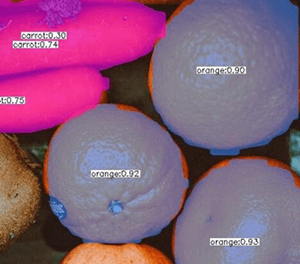
Instance Segmentation node detects individual object instances and returns both pixel-level segmentation contours and standard object metadata for each instance.
Unlike bounding-box detection, this node provides the precise shape boundary of each detected object. Unlike semantic segmentation, each instance is treated separately — two overlapping objects of the same class produce two distinct contours. Use this node when exact shape boundaries matter, such as for area measurement, masking, or defect inspection.
Input
Input Image
image requiredThe image frame to analyze. Connect this to a camera or upstream image output.
Model Directory Path
string requiredPath to the segmentation model directory. See Model Directory Path for details.
Confidence Threshold
number requiredMinimum confidence score to keep a detected instance. See Confidence Threshold for tuning guidance.
Default: 0.5
Ignore Labels
arrayList of label strings to exclude from the output. Instances with a matching label are discarded even if they meet the confidence threshold.
Overlay Results
boolean requiredWhether to draw filled segmentation masks and bounding boxes on the output frame. See Overlay Results.
Custom Model Configs
booleanReveals extra framework and architecture fields for non-.nam models. See Custom Model Configs.
Model Color Format
Color format of the image data sent to the model. If left blank, the default for the chosen architecture is used. Adjust if your model was trained with a different color format.
RGB- Red, Green, Blue channel order.BGR- Blue, Green, Red channel order.
Scale
Multiplicative factor for the R, G, and B channels of the image before sending to the neural network. If left blank, the default for the chosen architecture is used. Used to normalize pixel values to the range expected by the model.
Mean
Mean values for the R, G, and B channels that are subtracted from the image before sending to the neural network. If left blank, the default for the chosen architecture is used. Used to normalize the image to match the data distribution the model was trained on.
Input Format
Tensor format for the image data sent to the neural network. If left blank, the default for the chosen architecture is used.
NHWC- Batch x Height x Width x Channel (channels last).NCHW- Batch x Channel x Height x Width (channels first).
Input Type
Data type of the image input sent to the neural network.
Uint8- Pixel values are integers in the range 0-255.Float32- Pixel values are 32-bit floating point numbers, often in the range 0.0-1.0 or normalized according to the model's training.
Post Process Type
Method for processing the raw output from the neural network before producing final instance masks and detections. If left blank, the default for the chosen architecture is used.
semseg_tf1: TensorFlow 1 style instance segmentation"detection_out": [1*1*N*7], [ 1_image_id, 1_class_id, 1_score, 1_x1, 1_y1, 1_x2, 1_y2, ..., n_image_id, n_class_id, n_score, n_x1, n_y1, n_x2, n_y2 ], "mask_out": [N*C*H*W], [ 1_class1_mask(H*W), ..., 1_classC_mask(H*W), ..., n_class1_mask(H*W), ..., n_classC_mask(H*W) ]
Note
N: number of detected objectsC: number of classes (excluding background)H x W: per-instance mask resolution before resize to bounding box
Output
Overlay Image
imageOutput frame from the node. If overlays are enabled, each segmented instance is shown with a filled color mask and bounding box.
Detected Count
integerNumber of object instances segmented in the current frame.
Detected Objects
arrayArray of segmentation result objects. Each object contains:
bboxarray: Bounding box[x, y, width, height]of the instance.contourarray: Pixel-level boundary points of the segmented instance as[x, y]pairs.labelstring: Predicted class label.confidencenumber: Detection confidence score.