
Pose Estimation
Overview
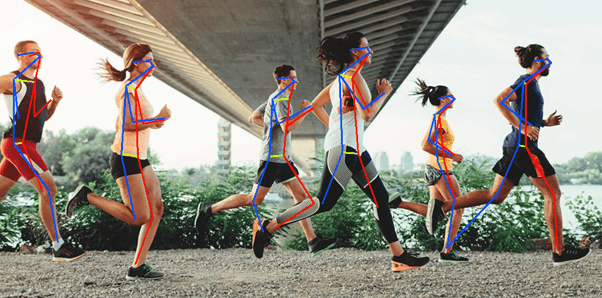
Pose Estimation node detects human keypoints (body joints) and full pose structures from the input frame. It can optionally classify the detected pose into a high-level state such as standing or sitting.
Use this node for ergonomics monitoring, activity recognition, or triggering rules based on body posture.
Input
Input Image
image requiredThe image frame to analyze. Connect this to a camera or upstream image output.
Pose Estimation model
string required advancedPose estimation model to use.
Values:
ONMMP_RTMO_TINY(default) — RTMO Tiny; fast multi-person pose estimation.ONMMP_RTMO_SMALL— RTMO Small; higher accuracy than Tiny.ONTFL_MOVENET_LIGHTNING_MULTIPOSE— MoveNet Lightning MultiPose.ONTFL_MOVENET_LIGHTNING_SINGLEPOSE— MoveNet Lightning SinglePose; fastest single-person option.ONTFL_MOVENET_THUNDER_SINGLEPOSE— MoveNet Thunder SinglePose; more accurate single-person model.
Choose a model based on the number of people in frame and your speed/accuracy requirements.
Bounding Box Confidence Threshold
number required advancedMinimum confidence that a person bounding box was detected.
Range: 0.0 to 1.0
Default: 0.1
Overlap threshold
number required advancedBoxes overlapping Filter (higher allows more overlap). See Overlap threshold for tuning guidance.
Default: 0.5
Point Confidence Threshold
number required advancedMinimum confidence that an individual key point was detected.
Range: 0.0 to 1.0
Default: 0.1
Analyze Pose
boolean required advancedWhen enabled, the node evaluates each detected pose and assigns high-level state labels (for example standing, sitting, lying down, T-pose) based on keypoint geometry. The states are included in each result object.
Default: true
Use TensorRT if available
boolean advancedTry TensorRT on Nvidia GPUs for inference. The first run may convert the model; later runs are faster. Incompatible models fall back with a warning.
Default: false
Overlay results
boolean required advancedWhether to draw skeleton lines and joint points on the output frame. See Overlay Results.
Default: true
Draw labels
boolean required advancedDraw key point labels on the frame.
Default: false
Output
Overlay Image
imageOutput frame from the node. If overlays are enabled, detected skeletons and joint labels are drawn on this frame.
Detected Count
integerNumber of persons or poses detected in the current frame.
Detected Objects
arrayArray of pose result objects. Each object contains:
- Bounding Box (
bbox) —[x, y, width, height]around the detected person. - Label (
label) — detection label. - Confidence (
confidence) — overall detection confidence. - Points (
points) — joint positions as[x, y]pairs. - Point Labels (
pointLabels) — names for each joint. - Point Confidences (
pointConfidences) — confidence per joint. - Analyzed Poses (
analyzedPoses) — high-level pose state labels when Analyze Pose is enabled.