
OCR
Overview
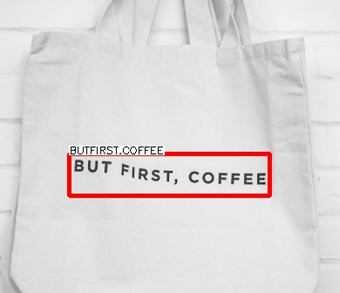
OCR node detects text regions in an input frame and recognizes the characters within those regions.
Use this node to extract printed or handwritten text from documents, labels, signs, or displays. The node runs a two-stage pipeline: a detection model first locates text bounding boxes, then a recognition model reads the characters inside each box.
Input
Input Image
image requiredThe image frame to process. Connect this to a camera or upstream image output.
Detection model
string requiredModel used to locate text regions in the frame.
Values:
PPOCRv6_DET_SMALL— PP-OCRv6 Small detector.PPOCRv6_DET_TINY— PP-OCRv6 Tiny detector; faster, lighter.DB(default) — Differentiable Binarization; accurate for most printed text scenarios.NONE— skips detection and passes the entire frame to the recognition model directly.
Recognition model
string requiredModel used to read characters from each detected text region.
Values:
PPOCRv6_REC_SMALL— PP-OCRv6 Small recognizer.PPOCRv6_REC_TINY— PP-OCRv6 Tiny recognizer.PPOCRv5_REC_MOBILE_TH— PP-OCRv5 Mobile Thai recognizer.CRNN(default) — Convolutional Recurrent Neural Network; accurate for printed text.
Language
string requiredRecognition language for PP-OCRv6 recognizers (PPOCRv6_REC_SMALL / PPOCRv6_REC_TINY). Appears only for those recognition models.
Default: en
Common values include en (English), ch (Chinese Simplified), chinese_cht (Chinese Traditional), japan (Japanese), and many other PP-OCR language codes.
Overlay results
boolean required advancedWhether to draw text region boxes and recognized text on the output frame. See Overlay Results.
Default: true
Draw lines
boolean required advancedDraw text-region outlines on the overlay.
Default: true
Draw text
boolean required advancedDraw recognized text strings on the overlay.
Default: true
Draw confidence
boolean advancedDraw recognition confidence scores on the overlay.
Default: false
Confidence threshold
number advancedMinimum detection confidence for keeping a text region. Shown when Detection model is not NONE.
Range: 0.0 to 1.0
Default: 0.5
Box Width Range / Box height Range
array advancedPixel [min, max] filters for detected text box width and height. Shown when Detection model is not NONE. Boxes outside the ranges are discarded.
Default: [0, 100000] for each
Detection pixel threshold / Detection box threshold / Unclip ratio
number advancedPP-OCRv6 detection tuning (when Detection model is PPOCRv6_DET_SMALL or PPOCRv6_DET_TINY):
- Detection pixel threshold — pixels above this score are treated as text (default
0.3). - Detection box threshold — boxes whose average pixel score is above this are kept (default
0.6). - Unclip ratio — expansion coefficient for detected text regions (default
1.5).
Binary threshold / Polygon threshold / Unclip ratio / Maximum result / Padding Scale
number integer array advancedDB-specific detection tuning (when Detection model is DB):
- Binary threshold (default
0.3) - Polygon threshold (default
0.5) - Unclip ratio (default
1.5) - Maximum result (default
100) - Padding Scale —
[width, height]scale factors (default[1, 1])
Recognition score threshold
number advancedMinimum recognition score to keep a text result. Shown for PP-OCR recognizers.
Range: 0.0 to 1.0
Default: 0
Text line orientation
boolean advancedClassify and correct text-line orientation before recognition (PP-OCR recognizers).
Default: false
Use TensorRT if available
boolean advancedTry TensorRT on Nvidia GPUs when using PP-OCR detection or recognition models. The first run may convert the model; later runs are faster.
Default: true
Output
Overlay Image
imageOutput frame from the node. If overlays are enabled, text regions and recognized strings are annotated on this frame.
Detected Count
integerNumber of recognized text regions in the current frame.
Detected Texts
arrayArray of recognized text objects. Each object contains:
- Points (
contour) — polygon points of the text region. - Bounding Box (
bbox) —[x, y, width, height]. - Detected Text (
label) — the recognized string.